
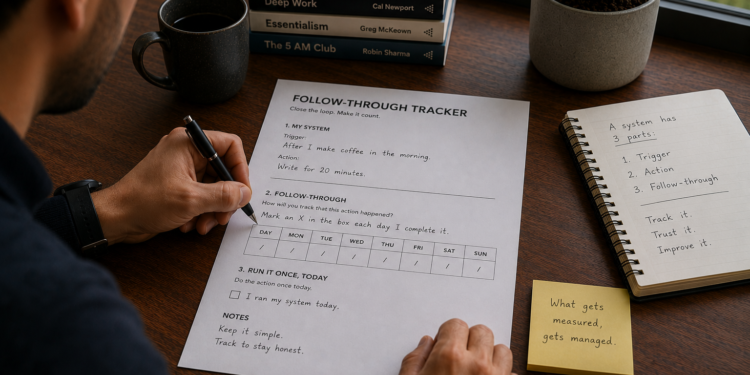
A trigger and an action aren’t a complete system without a way to check whether it happened. The Follow-Through Tracker adds that third part, then has you run the whole thing once, today.
The part that tells you the truth
The follow-through feels like paperwork, which is exactly why it gets skipped. It isn’t. Without it, you can’t tell the difference between a system that’s working and one that’s quietly failing, until the gap is too wide to close in a day.
This is the same discipline behind the dashboards I built managing projects at IBM, not because tracking is satisfying on its own, but because it’s the only honest way to catch a slip early.
Who this is for, and how long it takes
About 7 minutes. For anyone who has a trigger and action defined and needs the last piece.
What’s inside
- A follow-through field.
- A checkbox to run the system once, today.
How to get the most out of it
Choose something simple enough to actually keep using. A tally beats an elaborate tracker you’ll abandon in a week.
What changes if you actually do this
The output is a complete, running system. The outcome is that you can tell the difference between working and failing before it’s too late. The impact is that your intention survives an ordinary bad week.
Download The Follow-Through Tracker
Next step: The Quality Review Checklist, for once your system is producing something to actually ship.
FAQ
How is this different from the full Continuity Design Template?
Same content, split in two. This is the second half, for after you’ve already defined a trigger and action.
What if my trigger fails in the first few days?
Change the trigger before you change anything else. It’s the most common point of failure.
Do I need special tools to track follow-through?
No. A paper tally or a single note works better than an app most people abandon within a week.