
Some ideas are too complex for a list. A strategy with many dependencies, a program with several stakeholders, or a project with many moving parts does not fit neatly into a document read from top to bottom. When the structure stays in your head, it is hard to share, easy to lose, and difficult to improve.
MindManager is visual mapping and planning software. It lets you build mind maps, concept maps, flowcharts, timelines, and project views, then connect them to tasks, notes, links, and files. It is available on desktop and on the web, with integrations for common workplace tools.
The connection to Intention is clarity. The Method starts with understanding what you are trying to achieve and how the parts relate. A visual map makes that structure explicit, so you can see gaps, priorities, and connections that are invisible in a linear document.
What MindManager Does Differently
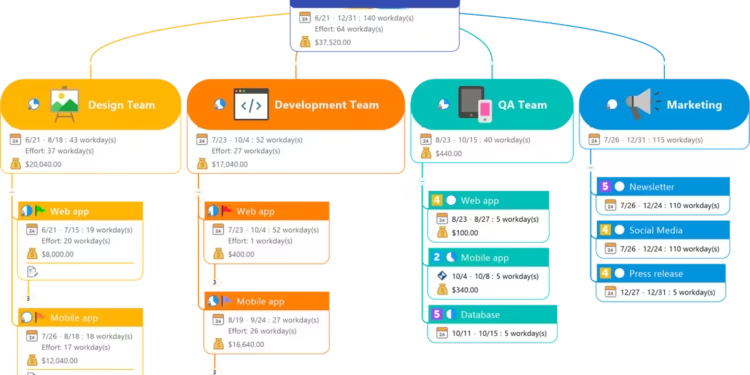
The main difference is the move from brainstorming to planning. Many mind-mapping tools stop at ideas. MindManager lets you attach dates, priorities, and resources to branches and view them as timelines or task lists, so a map can evolve into an actionable plan.
The second difference is range of views. The same information can be shown as a map, an outline, a timeline, or a flowchart, which helps different people understand a plan in the format that suits them.
The Honest Part
MindManager is a professional tool with many features, and it can feel heavy if you only need quick brainstorming. Simpler free tools may be enough for occasional mind maps.
It is a paid product, offered through subscriptions for individuals and teams. A map also does not replace thinking: a detailed diagram of unclear ideas is still unclear. Check MindManager’s site for current plans and any free trial.
Three Principles Worth Keeping in Mind
- Start from the central question. Put the real decision or goal at the center before adding branches.
- Prune often. Remove branches that no longer matter so the map stays readable and useful.
- Turn maps into action. Once the structure is clear, assign owners and dates so the map becomes a plan.
Where This Fits in the Bigger Picture
Complex work becomes manageable when its structure is visible. Seeing the whole picture helps you decide what matters most and explain it clearly to others.
MindManager supports that shift from scattered thoughts to clear structure. Used deliberately, it strengthens Intention, supports a clear System for planning, and helps complex projects move toward Impact.
FAQ
Is MindManager only for mind maps?
No. It also supports flowcharts, concept maps, timelines, and project planning views.
Can teams collaborate in MindManager?
Yes. It offers sharing and collaboration features, depending on the plan.