
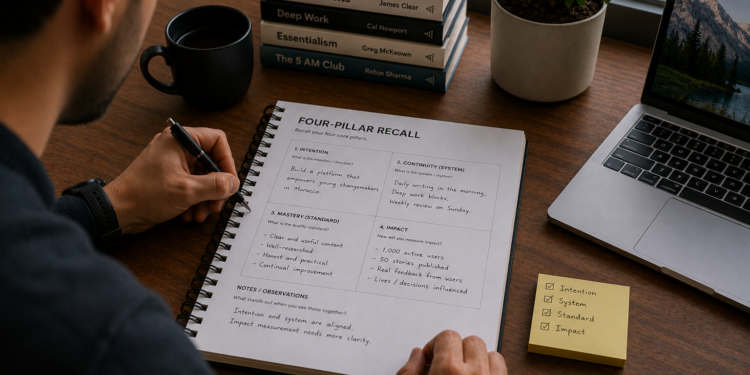
By the time you have a clear intention, a working rhythm, a real quality standard, and a way to measure impact, you’ve built four separate pieces, not yet one system. The Four-Pillar Recall lays them out side by side, the first step before connecting them.
Four pieces don’t make a system on their own
I’ve watched founders with a genuinely clear intention, a decent routine, and real standards still fall apart under pressure, because nothing connected the pieces. One bad week hit all four at once, and there was no structure underneath holding them together.
Recall is the first step toward that structure, not the whole thing.
Who this is for, and how long it takes
About 7 minutes. Needs an intention, a system, a standard, and an impact measure already in some form, from whichever exercises you’ve completed.
What’s inside
- Four recall fields, one per pillar.
How to get the most out of it
Copy what you’ve already written rather than editing it now. Editing comes later, once you can see the whole thing.
What changes if you actually do this
The output is one document with all four pillars in one place. The outcome is that you can finally compare them side by side. The impact is that imbalance becomes visible instead of staying a vague feeling.
Download The Four-Pillar Recall
Next step: The System Layer Worksheet, which connects these four pieces to what actually holds them together.
FAQ
How is this different from the full Personal OS Blueprint?
The full blueprint includes this recall step plus the System layer and a read-back, in one roughly 30-minute sitting. This is just the recall, the first third.
Do I need to complete all four pillar exercises first?
You need something written for each, even a rough draft. The recall has nothing to pull from otherwise.
What if one pillar is clearly weaker than the others?
Write it down honestly anyway. That’s exactly what the next worksheet is built to catch.



![Why Does Your System Only Work When You Feel Like It? (The Two Parts Every System Actually Needs) Every system that holds has the same starting point: a fixed trigger and one small, defined action. The Trigger-Action Designer builds both in about 7 minutes, the two parts most plans skip in favor of just deciding to try harder. A system is a structure, not a feeling At IBM, we didn’t manage large accounts by hoping the team felt inspired on a given Tuesday. We built fixed checkpoints, specific and repeatable. I didn’t think of that as a life skill at the time. It is one. A trigger has to be fixed, never “whenever I feel like it,” and an action has to be small enough to do without deciding. Who this is for, and how long it takes About 7 minutes. For anyone who has an intention but no system carrying it yet. What’s inside A trigger field. An action field. A worked example. How to get the most out of it Resist making the action bigger than it needs to be. Small enough to do without deciding is the whole point. What changes if you actually do this The output is one designed system start. The outcome is that the action becomes something you don’t have to decide on. The impact is that your intention gets a structure to run on. Download The Trigger-Action Designer [Download button placeholder, to be added.] Next step: The Follow-Through Tracker, which adds the part most systems skip and runs the whole thing for the first time. FAQ How is this different from the full Continuity Design Template? The full template includes the follow-through step too, in one sitting. This is the first half, for a quick start. What if I can’t think of a good trigger? Anchor it to something that already happens every day, closing your laptop, making coffee, a specific time. Consistency matters more than cleverness. Does this work for team systems, not just personal ones? Yes. The same trigger-and-action logic applies to a team habit as much as a personal one.](https://yassinebentaleb.com/wp-content/uploads/2026/07/Why-Does-Your-System-Only-Work-When-You-Feel-Like-It-The-Two-Parts-Every-System-Actually-Needs-350x250.png)
