Serious work on a computer depends less on one big application than on a collection of small ones: something to clean up files, something to capture the screen, something to write without distraction, something to edit a PDF. Assembling that collection usually means researching, buying, and tracking licenses for each tool separately, which is exactly the kind of administrative friction that pulls attention away from the work itself.
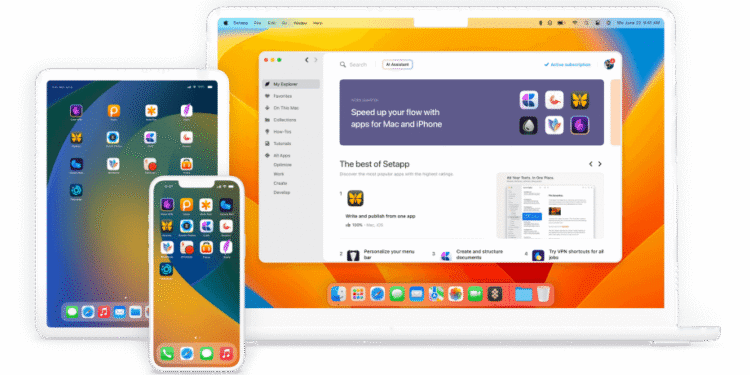
Setapp is a subscription bundle of Mac and iOS apps. For a single monthly fee, you get access to a curated library of more than 240 applications covering writing, design, file management, screen recording, PDF editing, productivity, and more. New apps are added to the library over time, and there are no separate purchases or in-app upgrade fees while you are subscribed.
The connection to Mastery is in the quality of the tools you work with. The Method treats craft as something built through deliberate practice with the right instruments. A curated toolkit makes it easier to try well-made utilities, keep the ones that genuinely improve your work, and ignore the rest without paying for each experiment.
What Setapp Does Differently
The main difference is the model. Instead of evaluating and buying tools one at a time, you explore a catalog and use whatever fits your workflow. That lowers the cost of experimentation, which matters when the best tool for a task is often one you have not heard of yet.
The second difference is predictability. One subscription replaces a scattered set of licenses and renewals. For a solo professional or a small team working on Macs, that simplicity has value in itself, both financially and in the attention it saves.
The Honest Part
Setapp only makes sense if you regularly use several of the apps it includes. If you need one specific utility, buying that single app directly is likely cheaper. Before subscribing, browse the catalog and confirm it contains at least three or four tools you would actually use every week.
It is also limited to Mac and iOS, so it does not help anyone working on Windows. And because access ends when the subscription ends, you should make sure the files you create are saved in standard formats that other apps can open.
Three Principles Worth Keeping in Mind
- Audit before you subscribe. List the small tools you already pay for or wish you had, then check how many of them are in the catalog. The overlap tells you whether the bundle is a saving or an extra cost.
- Adopt slowly. Add one new app to your workflow at a time and give it a week before adding another. A toolkit is useful when each tool has a clear role, not when you have installed everything available.
- Save in open formats. Export important work in formats that remain usable outside any single app, so your work stays yours regardless of which subscription you keep.
Where This Fits in the Bigger Picture
Tools do not create mastery, but the right tools remove friction from the practice that does. A well-chosen toolkit lets you spend more of your attention on the craft and less on the mechanics of getting set up.
Setapp is a practical option for Mac users who want a broad, curated set of utilities under one predictable cost. Chosen deliberately and used selectively, it supports a cleaner System for daily work and the steady Mastery that comes from working with good instruments.
FAQ
Does Setapp work on Windows?
No. Setapp covers Mac and iOS apps only, so it is not a fit for teams working on Windows machines.
What happens to my work if I cancel Setapp?
You lose access to the bundled apps when the subscription ends. Files you created generally remain on your device, but you may need another app to open or edit them, which is why saving important work in standard formats matters. Check Setapp’s site for current pricing and terms.